
If you'd like to move a domain registered with us to another company, the process depends on the domain ending.
Before you start
- Moving your domain doesn't move your website or email. If those are hosted with us and you'd like to keep them running, check with your new provider before you transfer.
- Make sure your domain hasn't expired. If it's due to expire soon, it's best to renew it first so it doesn't lapse during the transfer.
- Check the contact details on your domain are correct. See How to update your domain's contact details.
Transferring a .uk domain
UK domains (such as .co.uk and .uk) are moved by changing their "tag" to your new provider's tag. Your new provider will tell you what their tag is.
- Log in to your client area and go to My Domains.
- Click the domain you want to move.
- Click Release Domain in the menu on the left.
- Enter your new provider's tag in New Registrar Tag, exactly as they've given it to you.
- Click Release Domain.
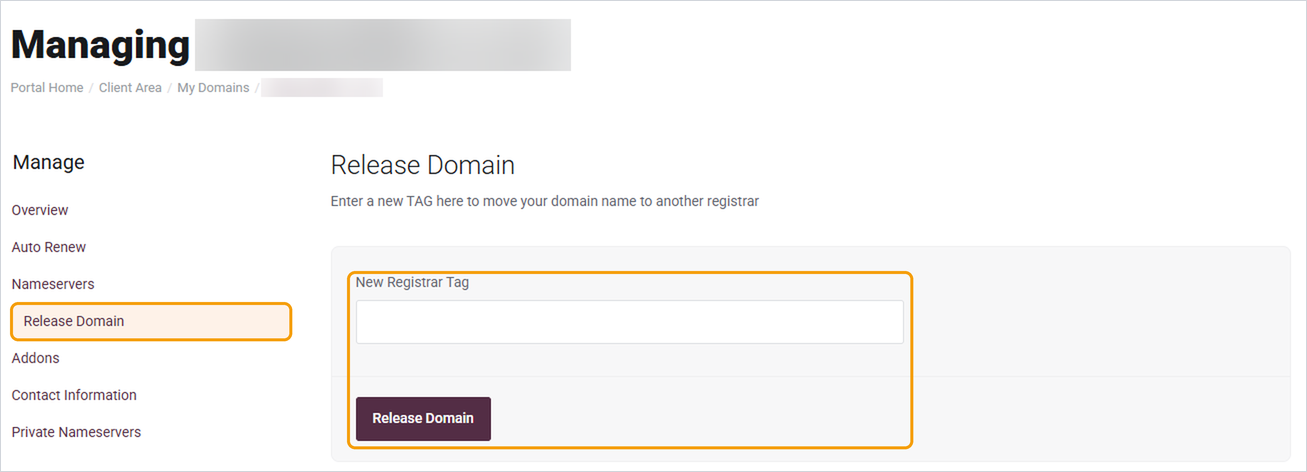
The change usually goes through within a few hours. Your new provider will let you know once they can see the domain.
Transferring other domains
For other endings, such as .com, .org or .net, you'll need an authorisation code (sometimes called an EPP code) to give to your new provider. Open a ticket with the domain name and we'll send it to you.
Good to know
- Double-check the tag before you click Release Domain. If it's wrong, the domain will go to the wrong company and it'll take longer to sort out.
- Once the transfer is complete, the domain will no longer appear in your Barruko account, and we won't renew it for you.


