
If your domain is registered with another company, you can move it to Barruko so it's managed in the same place as your hosting and billing. The process depends on the domain ending.
Before you start
- Make sure the domain hasn't expired.
- Check the contact email on the domain is one you can access, as you may need to approve the transfer by email.
- Transferring a domain doesn't move your website or email. If those are hosted elsewhere, they'll keep working as long as the nameservers stay the same.
Transferring a .uk domain
UK domains (such as .co.uk and .uk) don't use an authorisation code. Instead, your current provider changes the domain's "tag" to ours.
- Open a ticket and let us know which domain you'd like to move. We'll confirm our tag and set the transfer up for you.
- Ask your current provider to change the domain's tag to the one we give you. Many providers let you do this yourself in their control panel.
- Once the tag has been changed, the domain will appear in your Barruko account, usually within a few hours.
Transferring other domains
For other endings, such as .com, .org or .net, you'll need an authorisation code (sometimes called an EPP code) from your current provider.
- Log in to your current provider, unlock the domain and request the authorisation code.
- Log in to your Barruko client area and go to My Domains, then click Transfer in a Domain on the left. You can also find it under Domains in the footer.
- Enter the domain name and click Order Now.
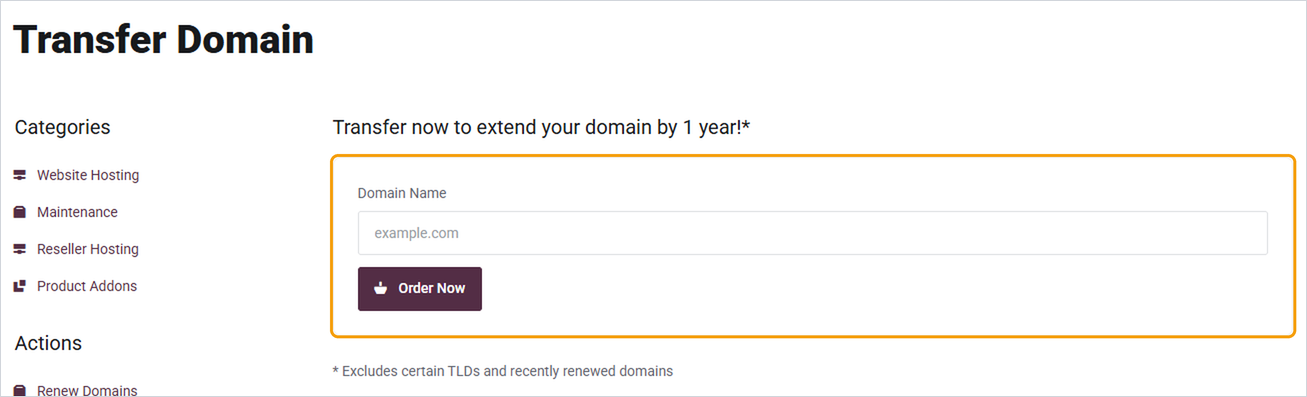
- Enter the authorisation code when asked, then complete checkout.
- Look out for an email asking you to approve the transfer, and approve it.
Transfers usually take up to 7 days. You'll get an email once it's complete, and the domain will appear in My Domains.
Good to know
- Your website and email shouldn't be affected during the transfer, as long as the nameservers aren't changed.
- Once the domain is with us, check its contact details and turn on auto-renew so it doesn't lapse.


