
You can check whether a domain name is available and register it through your client area. If you're also getting hosting from us, you can add both in the same order.
Before you start
- Have a few options in mind. Short, easy-to-spell names work best, and the one you want may already be taken.
- For a UK business, a .co.uk or .uk domain is usually the best choice. Some businesses also register the .com to stop anyone else using it.
Registering a domain
- Log in to your client area and click Register a New Domain under Domains in the footer.
- Type the domain you'd like, including the ending (for example yourbusiness.co.uk), and click Search.
- If it's available, click Add to Cart.
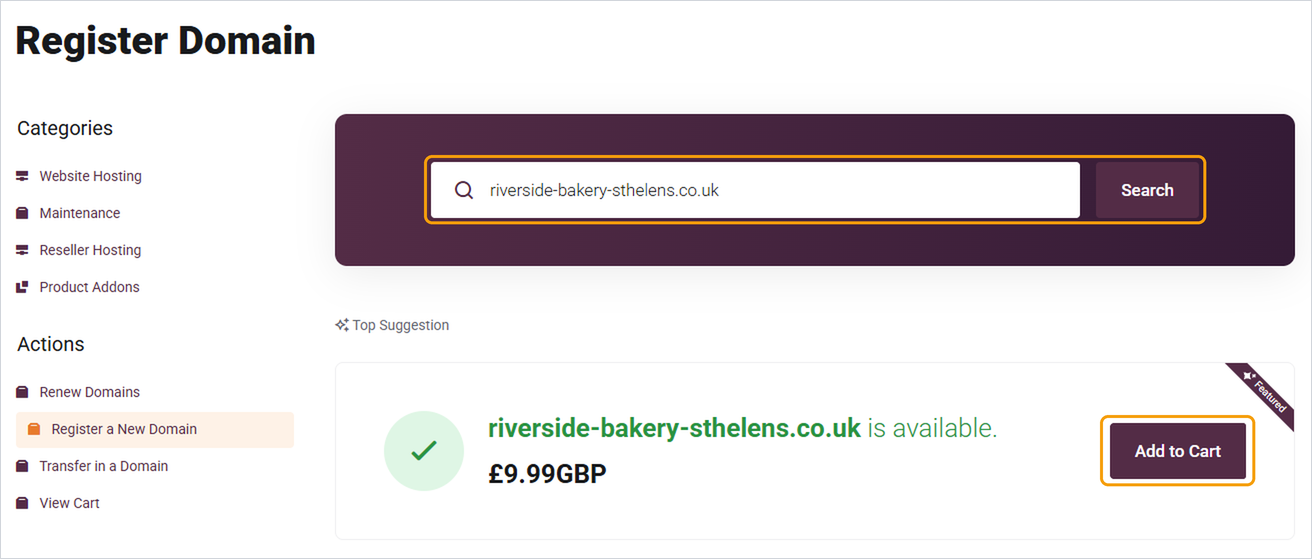
- If it isn't available, try a different ending from the Most Popular list, or one of the Suggested Domains further down the page.
- When you're ready, go to your cart, choose how many years to register it for, and complete checkout.
Once the order is paid, your domain is usually registered within a few minutes and will appear in My Domains.
Good to know
- You can also search from the domain search box on the Barruko website without logging in. You'll be asked to log in or create an account at checkout.
- The details on your account are used as the domain's contact details, so make sure they're correct. See How to update your domain's contact details.
- Turn on auto-renew so the domain doesn't expire. See How to renew your domain and manage auto-renew.
- If you already own the domain with another company, you can move it to us instead. See How to transfer a domain to Barruko.


