
If you can't get into your WordPress dashboard, try these options in order.
1. Check you're using the right address
The WordPress login page is usually at yourdomain.co.uk/wp-admin. Some websites use a different login address for security. If that's the case for yours, we'll have let you know when we built it, or you can ask us.
2. Reset your password by email
- On the login page, click Lost your password?
- Enter your username or email address and follow the link in the email WordPress sends you.
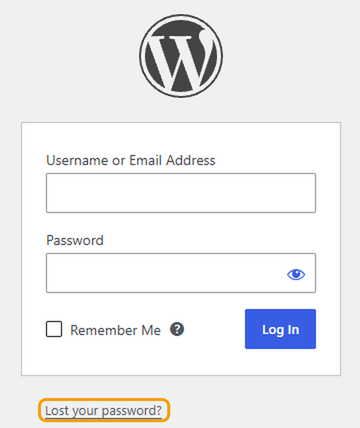
If the email doesn't arrive within a few minutes, check your spam folder, or try one of the options below.
3. Log in from cPanel
You can log straight in to WordPress from cPanel, without your WordPress password.
- Log in to cPanel. See How to log in to cPanel if you're not sure how.
- In the menu on the left, click WordPress Manager by Softaculous.
- Find your website and click Login.
4. Change your password from cPanel
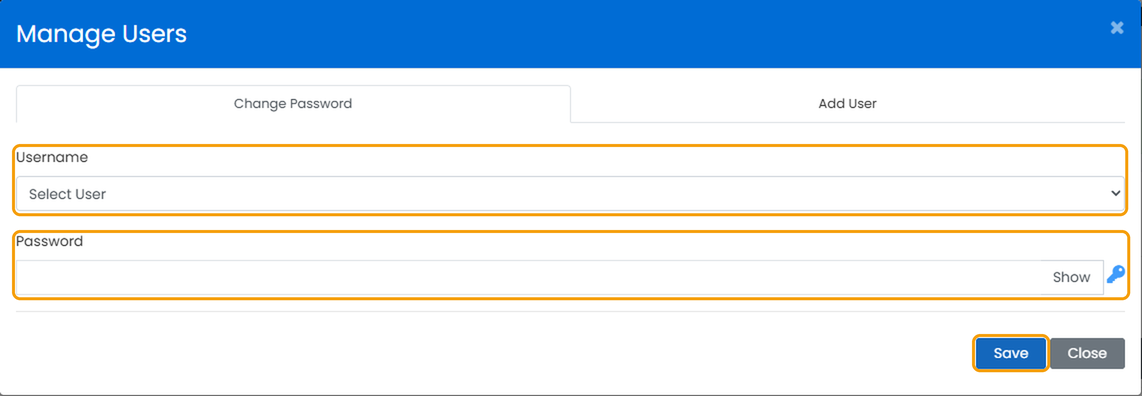
- In WordPress Manager by Softaculous, click Manage Users next to your website.
- Choose your username from the list, enter a new password and click Save.
Still can't get in?
- You've been locked out after too many attempts. Many websites have a security plugin that blocks logins for a while after several wrong passwords. Wait 30 minutes and try again.
- The login page won't load at all. You may have been blocked by our firewall. See I'm getting a 403 error or I've been blocked.
If none of these work, raise a ticket and we'll get you back in.


