
An autoresponder sends an automatic reply to anyone who emails you. It's useful for out-of-office messages, or to let people know you've received their email.
Setting up an autoresponder
- Log in to cPanel. See How to log in to cPanel if you're not sure how.
- Under Email, click Autoresponders.
- Click Add Autoresponder.

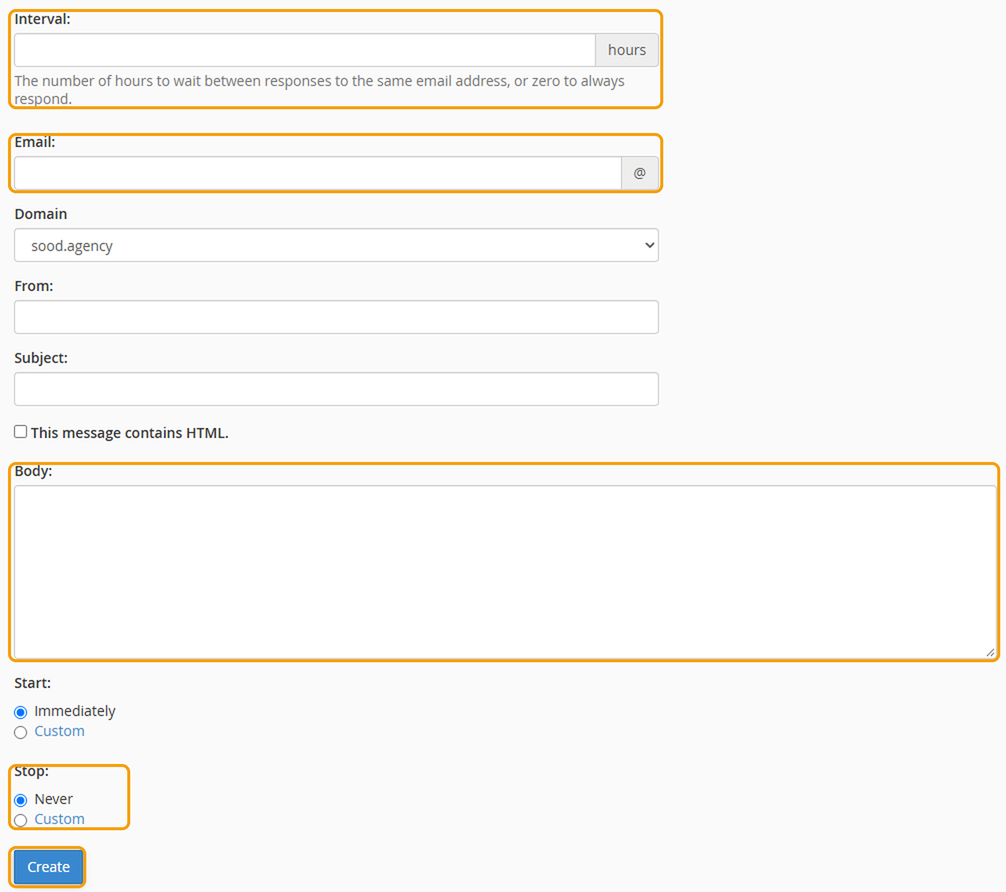
- Under Interval, enter how many hours to wait before replying to the same person again. 24 is a good choice, so people don't get a reply to every email they send.
- Under Email, enter the part of the email address before the @, and choose the domain from the list.
- Enter your name under From, and a Subject, such as "Out of office".
- Write your message under Body. For example, say when you'll be back and who to contact if it's urgent.
- Under Start and Stop, choose Custom to set the dates the autoresponder should run. If you leave them as they are, it starts straight away and runs until you remove it.
- Click Create.
Emails you receive still arrive in your mailbox as normal. The autoresponder just sends a reply as well.
Turning it off
Go back to Autoresponders, find it under Current Autoresponders and click Delete. If you set a stop date, it turns off by itself.


