
If you've forgotten your client area password, you can reset it yourself in a couple of minutes.
Before you start
You'll need access to the email inbox you used when you signed up. If you can't remember which email address that was, see I can't access my client area.
Resetting your password
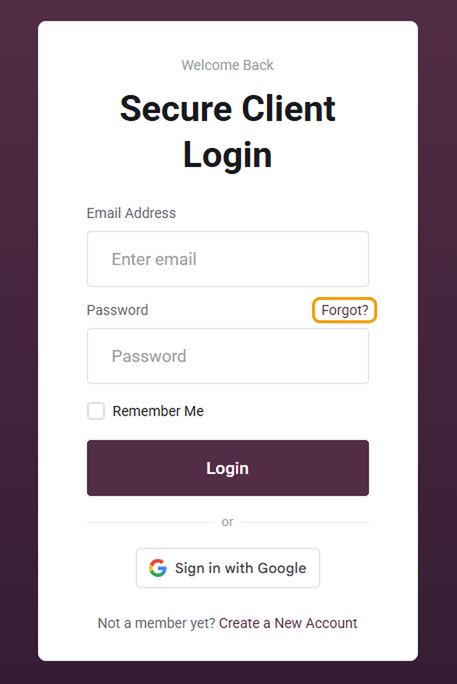
- Go to barruko.co.uk/billing/login and click Forgot? next to the password box.
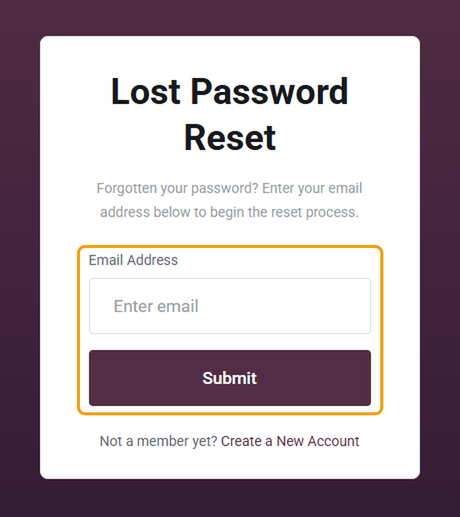
- Enter the email address you signed up with and click Submit.
- Open your inbox and click the link in the password reset email from Barruko.
- Enter your new password twice and save it.
- Go back to the login page and log in with your new password.
Good to know
- The email usually arrives within a minute or two. If it hasn't, check your spam or junk folder.
- The link in the email only works for a limited time. If it's expired, start again from step 1.
- This only resets your client area password. Your cPanel, webmail and WordPress passwords are separate.
- Use a password you don't use anywhere else. A password manager makes this easy.
Still can't get in?
If the reset email doesn't arrive, or you no longer have access to that inbox, open a ticket (you don't need to be logged in). Include the email address you think the account is under and the domain name on your account. We'll need to confirm it's you before we change anything.


