
You can create email addresses for your domain, such as [email protected], from cPanel. How many you can have depends on your hosting plan.
Creating an email account
- Log in to cPanel. See How to log in to cPanel if you're not sure how.
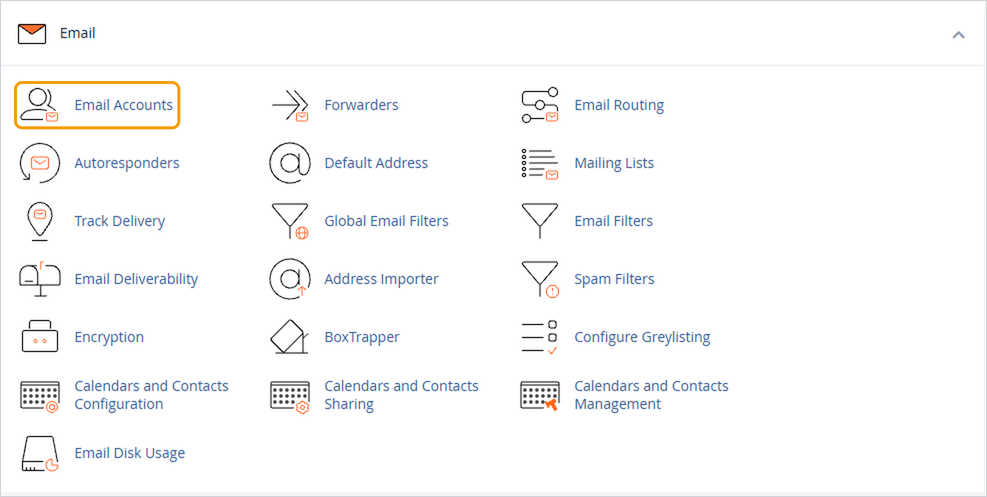
- Under Email, click Email Accounts.
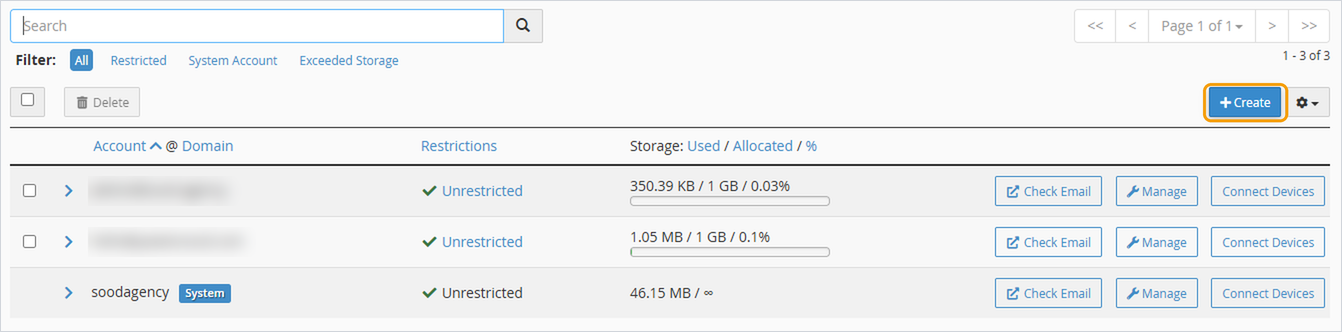
- Click Create.
- If you have more than one domain, choose the right one from the Domain dropdown.
- Enter the part before the @ in Username, for example hello.
- Set a strong password, or click Generate to create one. Save it somewhere safe, as you'll need it to set up the email on your devices.
- Click Create.
The new address works straight away. You can check it using webmail, or set it up on your phone or computer.
Good to know
- If you just want emails to one address to arrive in another inbox, a forwarder may be simpler than a new account. See How to set up email forwarding.
- You can usually leave the storage space on the default setting. Each mailbox's size is limited by your plan.
- Each email account has its own password, separate from your cPanel and client area passwords.


