
You can password-protect a folder on your hosting so that anyone visiting it has to enter a username and password first. This is useful for a website that's still being built, a staging copy, or files you only want certain people to see.
Choosing the folder
- Log in to cPanel. See How to log in to cPanel if you're not sure how.
- Under Files, click Directory Privacy.
- Find the folder you want to protect. Click a folder's name to open it and see the folders inside. Your main website is in public_html.
- Click Edit next to the folder.
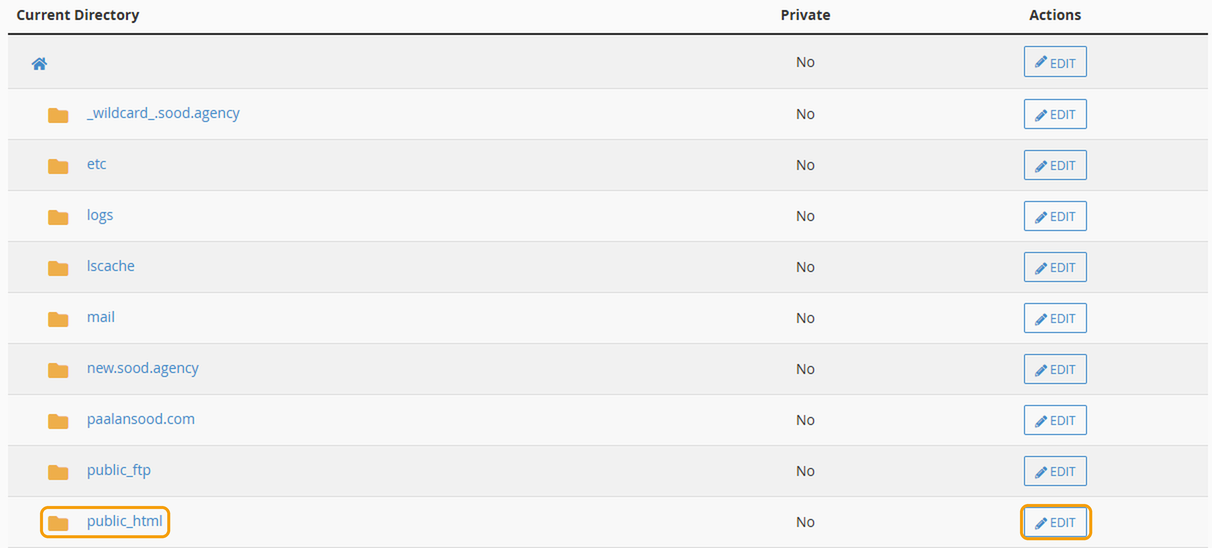
Protecting a folder also protects everything inside it. If you protect public_html, your whole main website will ask for a password.
Turning on password protection
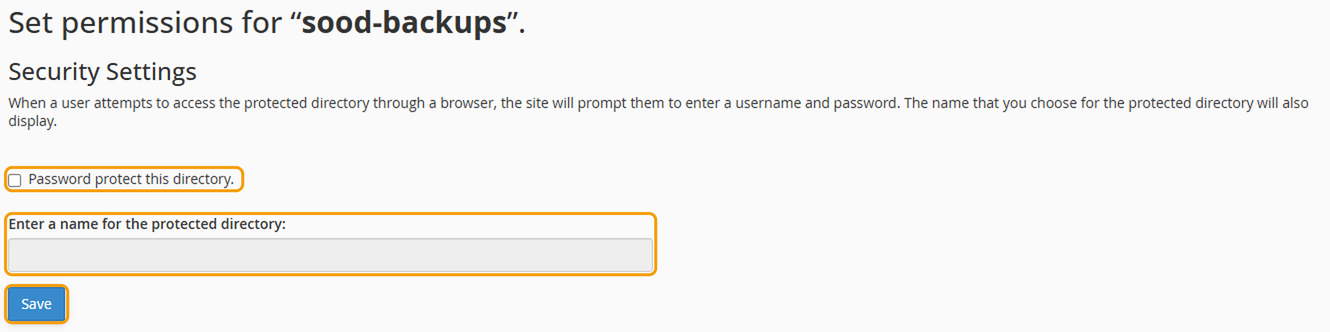
- Tick Password protect this directory.
- Enter a name for the protected area, such as "Staging site". Visitors see this when they're asked to log in.
- Click Save.
- Go back to the same page. Under Create User, enter a username and a strong password, then click Save. Add a user for each person who needs access.
Open the folder's address in a private window to check it asks for a password.
Turning it off
Go back to Directory Privacy, click Edit next to the folder, untick Password protect this directory and click Save.
If you'd like help, raise a ticket and we'll set it up for you.


